
Passwords Matter. But How You Use Them Matters Even More
Picture walking into your office in the morning, setting your things down, and getting ready for the day. Everything looks normal, nothing feels out of place, and work begins as usual. Now imagine the door wasn’t forced open the night before. It didn’t need to be, because the key was simply easy to find.
That’s how most security issues happen. Not dramatic or targeted, just small gaps that are easy to take advantage of when no one is looking.
For many nonprofits and charities, especially as their systems grow over time, this is exactly how problems start.
________________________________________
The Real Issue Usually Starts Somewhere Else
For most organizations, a security issue doesn’t begin inside their own systems.
It often starts with something small and forgettable, like a donation platform you used once, a vendor tool that is no longer top of mind, or a subscription tied to a former team member. If that system is ever compromised, the login details connected to it can be exposed without you ever knowing.
From there, automated tools quietly try those same credentials in other places, including email, cloud platforms, and internal systems. If a password has been reused, access becomes much easier than it should be.
This is something we see often in nonprofit IT support environments, because systems tend to grow over time without a clear reset point.
________________________________________
Why “Strong” Doesn’t Always Mean “Safe”
It’s completely reasonable to feel confident about passwords that follow best practices, especially when they include a mix of letters, numbers, and symbols.
The challenge is that strength on its own is no longer the deciding factor.
A well-constructed password can still create problems if it is used across multiple accounts, because the moment one system is exposed, anything sharing that password becomes more vulnerable as well.
At the same time, modern attacks are automated and efficient, which means they are designed to take advantage of small overlaps like reused credentials rather than trying to guess passwords one by one.
So the goal is not just stronger passwords, but making sure each system is managed independently as part of a broader approach to IT.
________________________________________
What Actually Makes a Difference
The good news is that improving this does not require complicated changes.
A password manager helps create and store a unique password for every account, so there is no overlap between systems. Your team does not need to remember dozens of passwords, and there is no need to reuse them just to stay efficient.
Multi-factor authentication adds a second layer by requiring something beyond the password, such as a prompt on a phone or a temporary code. This ensures that even if a password is exposed somewhere, it is not enough on its own.
Together, these steps reduce risk in a practical way and are a core part of how technology should support nonprofit teams day to day.
________________________________________
A Timely Reason To Take a Look
With World Password Day coming up this week, it is a natural moment to pause and take a quick look at how things are set up.
If each account in your organization has its own password and multi-factor authentication is already in place, you are in a strong position. If there are still shared or reused passwords, or systems with only one layer of protection, that is simply an opportunity to improve things step by step.
Most security issues are not caused by complex scenarios, but by small, fixable gaps that are easy to overlook until they matter.
________________________________________
If you are unsure where things stand, we are always happy to walk through it with you in plain language and at your pace. Give us a call.
Blog
AI is everywhere right now. Some of it is exciting—new ways to save time, new tools for doing good. But let’s be honest: it also feels a little scary. Because if you can use AI to make your work easier, cybercriminals can use it to make their scams more convincing.
That doesn’t mean you need to lose sleep over it. It just means knowing where the real risks are—and how to keep your mission safe.
The “Fake Face” in Your Zoom Call
Imagine logging into a video meeting and seeing your executive director… only it isn’t really them. Cybercriminals are now using AI deepfakes to impersonate trusted leaders. Their goal? Trick your staff into clicking the wrong link or downloading something dangerous.
👉 What to do: Remind your team it’s okay to pause. If something feels off, double-check by phone or another channel before acting. A two-minute call could save you a massive headache.
Emails That Look a Little Too Real
Phishing emails used to be easy to spot—bad spelling, clunky grammar, strange formatting. Not anymore. With AI, those scams now look polished, professional, and believable.
👉 What to do: Multi-factor authentication (MFA) is still your best defense. Even if someone clicks, MFA stops attackers from walking right in. And keep staff training simple but consistent—help people spot red flags like urgency, strange requests, or unusual attachments.
“Helpful” AI Tools That Aren’t What They Seem
Cybercriminals love shiny new trends. Right now, that means building fake AI tools loaded with malware. They look legit, but they’re just waiting to infect your systems.
👉 What to do: Before trying out new AI software, run it by us. We’ll check if it’s safe so you don’t have to worry.
Why This Matters for You
You didn’t start your non-profit to worry about phishing emails or deepfakes. But when tech fails—or worse, when you get hit by a cyberattack—it pulls time, energy, and resources away from your mission. That’s the real cost of ignoring these risks.
The good news? You don’t need to carry that weight alone. With the right defenses—MFA, simple staff training, and a trusted IT partner—AI doesn’t have to be scary.
Let’s Clear Out the Ghosts
Your mission is too important to get sidetracked by cybercriminals. Let’s make sure the only thing AI does for your organization is help, not harm.
👉 Want AI tools that work for you instead of against you? Sign up for our Campaign writing webinar at https://www.humanitcompany.ca/ai-assistant-webinar/
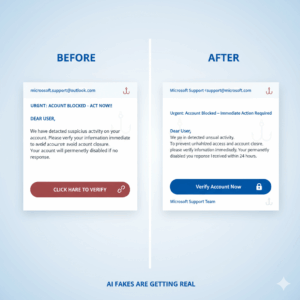
“Phishing emails used to be easy to spot—bad spelling, clunky grammar, strange formatting. Not anymore.”

If There’s a Data Breach—Who’s Responsible?
Let’s ask the question no one wants to ask—but everyone should:
If our nonprofit suffers a data breach, who is responsible?
It’s a tough question. One that keeps operations managers, executive directors, and board members up at night—especially when sensitive donor or program data is at stake. As someone who’s been on both the nonprofit and tech support side, I want to offer clarity, not fear.
So let’s walk through it calmly, together.
The Hard Truth: No System Is 100% Unbreakable
Cybersecurity is like locking your doors, and training your team to spot suspicious activity. But even the best precautions can’t promise perfection. What matters most is how prepared you are, how quickly you respond, and who shares the responsibility when things go wrong.
Shared Responsibility: What IT Support Really Means
In most nonprofit/IT relationships, accountability is shared between the organization (you) and the service provider (IT provider).
🧩 Your Responsibilities:
- Choosing strong passwords and enabling multi-factor authentication (MFA)
- Training staff to avoid phishing scams and unsafe clicks
- Following data policies and access guidelines
- Reporting suspicious behavior or incidents immediately
🛡️Your Tech’s Responsibilities:
- Monitoring systems for threats 24/7
- Keeping software and security tools up to date
- Backing up data and testing recovery procedures
- Advising you on best practices and compliance requirements
- Responding fast when something goes wrong
A good IT provider won’t just sell you antivirus software—they’ll act as a partner in prevention and a first responder in a crisis.
What Happens If a Breach Occurs?
- Detection
The MSP should identify the breach quickly, alert your team, and begin investigating. - Containment
They’ll isolate affected systems and limit further exposure. - Recovery
They’ll restore from backups (if they’ve been tested) and guide your team through cleanup. - Reporting
Depending on what was exposed, your nonprofit may be legally required to notify donors, partners, or regulators.
This is why clear roles and a written incident response plan are vital. You don’t want to be Googling “data breach response” at midnight.
Who’s Legally Responsible?
It depends on your contract and local laws, but generally:
- Your organization is ultimately responsible for how donor data is handled.
- Your IT support is responsible for the tools, systems, and services they manage.
- If a breach results from negligence on either side, that party may be liable.
That’s why your agreement with your IT service should clearly define:
- Security responsibilities
- Data access protocols
- Service Level Agreements (SLAs)
- Breach notification timelines
Don’t Just Outsource—Collaborate
Your IT support should be more than just tech support. With co-managed IT services, they become strategic partners Who:
- Help build your data policies
- Train your team
- Provide breach drills or “what-if” scenarios
- Keep you compliant with regulations like PIPEDA and CRA requirements
It’s not just about blame. It’s about building a resilient, trusted partnership.
Nonprofits like yours deal in trust. A data breach doesn’t just threaten your systems, it threatens your credibility. But with the right IT support partner by your side, you’re not alone. You have guidance, protection, and someone who speaks your language. Human IT understands the unique pressures nonprofits face—and they’re here to help you stay safe while you stay focused on what matters.
How Much Does IT Support Actually Cost? A Plain-English Guide for Nonprofits
Let’s take a deep breath and talk about something that makes many nonprofit leaders nervous: the cost of IT support.
If you’ve ever wondered, “How much does it really cost to have a IT Services Company – you’re not alone. The truth is, most mission-driven organizations aren’t looking for the cheapest option. They’re looking for the most reliable, respectful partner who understands the weight they carry.
Let’s break it down together—no tech jargon, no sales pressure. Just clarity.
What Are You Really Paying For?
Think of an IT provider like hiring a tech team you don’t have to manage. Instead of calling someone only when things break, you get ongoing, proactive support that keeps your systems stable, secure, and stress-free.
Most IT service’s offer flat-rate monthly packages based on:
- Number of users or devices
- Services included (e.g., cybersecurity, backups, cloud support)
- Response times and service level agreements (SLAs)
- On-site vs. remote support

Average Cost for Nonprofits
IT support pricing for nonprofits can vary widely depending on your size, needs, and how complex your setup is. There’s no one-size-fits-all number, but that’s actually a good thing. It means you can find a solution that truly fits your budget and your mission.
Want a clearer picture of what makes sense for your organization?
Get Your Copy of the Non-Profit IT Buyer’s Guide — a quick, helpful resource to get your answers and plan your next tech step with confidence.
Can Nonprofits Afford This?
Here’s the better question: Can you afford not to?
Consider the potential costs of:
- Downtime during a funding campaign
- Ransomware locking up your donor database
- A data breach requiring legal notification and PR clean-up
- Staff burnout from constant tech hiccups
Compared to these, a reliable IT support is not an expense—it’s an investment in stability.
Are There Discounts for Charities?
Yes. Many Tech Companies offer:
- Nonprofit pricing tiers
- Annual plans that match grant cycles
- Free assessments or onboarding
- Bundled services with discounted rates
A good charity IT service provider understands that charities need flexibility, and they’ll work with you to find a plan that fits your mission and your budget.
What’s the ROI?
Let’s face it—every dollar matters in a nonprofit. So when you invest in IT support, you want to know: What do we actually get in return?
Here’s the real value:
-
Your team focuses on impact, not IT.
No more losing hours to login issues, printer errors, or mystery Wi-Fi problems. Your staff stays focused on serving your community—not on troubleshooting tech. -
People feel supported, not stressed.
When tech works and help is easy to reach, your team feels empowered. That boosts morale, confidence, and productivity. -
You build trust with donors and your board.
Strong systems show that you take data security and operational stability seriously. That builds confidence with everyone invested in your mission. -
You avoid costly, avoidable disasters.
A single data breach or system crash can set your work back months. Proactive IT support helps prevent problems before they start.
In short: when your tech runs smoothly, your mission moves faster. You don’t need to figure this out alone. Ask for a detailed, plain-English proposal. Ask what’s included—and what’s not. A mission-aligned IT company won’t push you into something you can’t afford.

Why Hybrid Work Is a Cyber Risk for Nonprofits: How to stay Protected
Whether your nonprofit team works remotely, in a hybrid setup, or from multiple locations, one thing is clear: donor data must stay secure.
But when staff are logging in from home offices, coffee shops, or shared spaces, the risks grow—and so does the need for smart, simple security. Hybrid work environments create new cybersecurity challenges, especially for organizations without full-time IT support.
So how can nonprofit leaders protect sensitive data without overwhelming their teams? Let’s walk through the essentials—together.
Why Hybrid Work Creates New Security Risks
Hybrid work is wonderful for flexibility and work-life balance. But it also introduces gaps that traditional office setups didn’t have:
- Personal devices used for work tasks
- Public Wi-Fi connections
- Inconsistent security settings
- Unclear rules around data sharing and storage
- Staff feeling unsure about what “secure” even means
Donor names, addresses, payment records, emails, and communication history may all be floating between devices and clouds—and that’s a problem if there’s no plan in place.
6 Ways to Protect Donor Data in Hybrid Teams
- Require Business-Grade Cloud Platforms
Free Google Drives and Dropbox folders aren’t enough. Use Google Workspace for Nonprofits or Microsoft 365 with nonprofit security features enabled—and managed by your IT service provider.
- Set Device Policies
Ensure every staffer knows whether they can use personal laptops or phones for work—and under what conditions. Encrypt devices. Require passcodes. Keep work apps separate.
- Enable Multi-Factor Authentication (MFA) Everywhere
It’s the simplest, strongest defense against unauthorized access—and it costs you nothing but a few minutes to set up.
- Train, Don’t Blame
Cybersecurity is a team culture issue, not just a tech one. Regular, judgment-free training sessions help staff recognize phishing, avoid unsafe downloads, and report mistakes early.
- Use Role-Based Access
Not everyone needs access to everything. Your MSP can help you set up permissions based on job roles—keeping donor data visible only to those who truly need it.
- Partner with a Mission-Aligned Tech Company
The right tech partner doesn’t just install tools. They help you translate policies into practice—in plain English—and respond fast when issues arise.

Security That Supports, Not Shames
Nonprofit staff aren’t meant to be cybersecurity pros—they’re here to serve. But hybrid work adds pressure, and without support, tech can feel overwhelming. That’s why clarity matters more than perfection.
With the right tools, clear policies, and kind IT support, nonprofits can have both flexibility and security. When people feel safe asking questions, your mission stays protected—and your team stays confident.
5 Hybrid Work Mistakes Nonprofits Should Avoid
-
Thinking “We’re Too Small to Be a Target”
Hackers look for vulnerable systems, not big budgets. They don’t care how big you are, only whether or not they can hack your systems. -
Using Personal Devices and Emails for Work
This creates security gaps you can’t monitor. Work accounts and secured devices are a must. -
Ignoring Software Updates
Delaying updates leaves doors open to cyber threats. Regular updates for applications AND operating systems (and others) = stronger protection. -
Sharing Logins Across the Team
Shared credentials make it impossible to trace activity and increase the risk of breaches. -
Skipping Cybersecurity Training
If your team doesn’t know what phishing looks like, they can’t avoid it. Short, clear training prevents big mistakes.
IT Security Tips for nonprofits
WHAT ARE TRAVEL SCAMS?
The vacation season should be a time of joy, reflection, and well-deserved rest. But for many small businesses, non-profits, and charities, it’s also a time of heightened vulnerability. Cybercriminals are well aware that during the hustle and bustle of the well deserved trip, organizations might let their guards down—and they’re ready to exploit this.
Imagine this: one of your employees receives an email confirming a vacation booking they didn’t make. In the rush to clear their inbox, they click the link. Within moments, your organization’s sensitive data is compromised. It’s a chilling scenario, and it’s happening far more often than you’d think.
WHY DOES THIS MATTER
For small organizations with limited IT resources, the stakes are high. Scammers target these groups because they often lack robust cybersecurity infrastructure. Whether it’s a non-profit relying on donations or a small business serving its community, any breach can have devastating consequences.
If you think, “This won’t happen to us,” think again. Small organizations are often the easiest targets for cybercriminals. With limited IT resources and tighter budgets, your charity or small business could be one click away from a serious breach.
Let’s break it down:
- Scammers don’t just want an individual’s money—they often use fake travel emails to infiltrate business systems.
- A single compromised account can open the door to your entire network.
- Even a small breach could lead to financial losses, reputational damage, and days of operational downtime.
So, how do you protect not just your peace of mind, but the integrity of your organization?
With the right IT support and preventative measures, you can protect your organization and continue your work with confidence. Limited resources can make it harder to detect and respond to cybersecurity threats. This is where managed IT services and professional cybersecurity support become indispensable.

COMMON TACTICS USED BY SCAMMERS TO ATTACK SMALL BUSINEES AND NON-PROFIT
The tactics scammers use are designed to play on our emotions: excitement, urgency, and even fear. Here’s what to look out for:
- Too-Good-To-Be-True Offers
“Get 70% off a luxury resort!” These deals often come from fake booking platforms designed to steal your payment details. - Last-Minute Cancellations
“Your booking has been canceled—click here to rebook.” These urgent messages trick people into rushing without verifying authenticity. - Impersonated Platforms
Cybercriminals often create fake sites that look nearly identical to legitimate travel companies. - Phishing Links
Embedded links redirect users to fraudulent websites designed to steal credentials or infect devices with malware. - Urgent Requests
Messages claiming limited-time offers or last-minute cancellations create a sense of urgency, prompting hasty decisions.

HOW TO PROTECT YOUR ORGANIZATION
- Educate Your Team
Conduct regular training sessions to help employees recognize phishing emails and fraudulent websites. Knowledge is your first line of defense. - Implement Strong Cybersecurity Measures
Work with a trusted provider of IT services to secure your organization. Tools like spam filters, firewalls, and endpoint protection are essential. - Use Managed IT Services
A managed IT service provider can proactively monitor your systems, identify threats, and respond swiftly to potential attacks. - Verify Before Clicking
Encourage staff to verify the legitimacy of emails and websites before clicking on links or providing information. - Backup and Recovery Solutions
Ensure your data is regularly backed up and accessible in case of a cyber incident.
FINAL TIPS FOR STAYING SAFE
- Use Credit Cards: They offer better fraud protection than debit cards.
- Monitor Bank Statements: Regularly check for suspicious transactions.
- Enable Two-Factor Authentication (2FA): Add an extra layer of protection to your accounts.
- Know the Recipient: Don’t send money to unfamiliar or unverified sources.
- Be Cautious with QR Codes: Verify the source before scanning.
- Research Before Booking: Check reviews and ratings before committing.
- Watch for Upfront Fees: Be wary of large upfront payments; a small deposit is usually enough.

DON’T LET SCAMMERS TAKE YOUR VACATION
This summer, take a proactive stance against seasonal scams. Equip your nonprofit with the tools, training, and IT support needed to safeguard your people and your mission. At The Human IT Company we help small teams navigate the cybersecurity landscape with confidence. Book your 15-minute discovery ‘pit stop’ with us today, and let’s chart a safer course together.

“Travel scams don’t take a vacation—make sure your cybersecurity doesn’t either. Small organizations are often the easiest targets for cybercriminals. With limited IT resources and tighter budgets, your charity or small business could be one click away from a serious breach!”
AI Chatbot Security Risks: Are Your Conversations Truly Private?
You’ve got enough on your plate. Between donor reports, hybrid team meetings, and keeping programs running smoothly, the last thing you need is another tech fire to put out. But here’s a quiet truth that deserves your attention:
That AI chatbot you’re using to save time? It might be sharing more than you realize.
For nonprofits, which often deal with sensitive donor information, personal data, and vulnerable communities, understanding the risks behind these AI tools is more crucial than ever. Tools like ChatGPT, Microsoft Copilot, Google Gemini, and DeepSeek are brilliant assistants—but only if you understand their risks. And if your nonprofit handles donor information, health records, or community-sensitive data, the stakes are too high to ignore.
What AI Chatbots Are Doing with Your Data
Every time you type a message to a chatbot, you’re sharing more than words. You’re handing over insights—some of them private, some of them mission-critical.
Let’s make this simple:
-
ChatGPT collects your prompts and usage data. These can be used to improve services—and may be shared with vendors.
-
Google Gemini stores data for up to three years. Even deleted entries might linger in systems used to train AI.
-
Microsoft Copilot tracks browsing and app use, sometimes sharing with third parties.
-
DeepSeek, a newer platform, stores your chat history and typing patterns—on servers based in China.
Now ask yourself: Would you share that kind of access with a stranger?
For nonprofits handling sensitive donor information, financial data, or details of vulnerable communities, the stakes couldn’t be higher. A single breach could jeopardize trust, funding, and the very communities you aim to serve.
Why This Hits Nonprofits Harder
We’re not just protecting data—we’re protecting trust. That includes:
-
Donor relationships built over years
-
Client confidentiality in sensitive programs
-
Board confidence in your digital maturity
A breach doesn’t just cost money. It can cost your mission. And the grief of explaining it to a stakeholder who believed in you? That’s a weight no spreadsheet can carry. These risks aren’t hypothetical; they’re already happening. And as nonprofits adopt these tools without full knowledge of their implications, they unintentionally expose themselves to vulnerabilities that could take years to repair.
Real Risks, Real Consequences
Let’s name the fear so we can move through it:
-
Data breaches: In 2024, DeepSeek suffered a breach due to poor cloud configurations. If it can happen to them, it can happen to anyone.
-
Noncompliance fines: Canadian nonprofits must follow privacy laws like PIPEDA. Violating them—even unintentionally—can lead to legal action or lost funding.
-
Reputation damage: A leaked donor list can unravel years of relationship-building.
You don’t need panic. You need a plan.
5 Ways to Keep Your Nonprofit Safe While Using AI Tools
Here’s what matters. And what doesn’t:
✅ Choose wisely: Stick with tools that let you control data retention. Ask about compliance with Canadian privacy standards.
✅ Limit what you share: Never input names, financial info, or personal data unless the tool is vetted and encrypted.
✅ Adopt a Zero-Trust model: Only authorized users should access AI platforms—and only for specific tasks.
✅ Train your team: Most breaches come from small mistakes. Help your staff understand what not to type.
✅ Review compliance regularly: Work with a local MSP familiar with PIPEDA, CRA, and nonprofit-specific needs.
Balancing Innovation and Security
Tech is supposed to make your life easier—not scarier.
If your AI tools are saving you time but keeping you up at night, something’s off. Let’s fix that, together. At our Managed service Company here in Vancouver, we specialize in helping nonprofits like yours feel confident, secure, and supported.
Want to assess your organization’s digital security? Start with a FREE Security Assessment today and ensure your nonprofit is safeguarded against modern cyber threats.
Microsoft Ends Free Licenses for Charities: What Nonprofits Must Know
If your charity uses Microsoft 365 Business Premium or Office 365 E1 through the Microsoft Donation Program (or via TechSoup), there’s a change coming you should know about: these donated licenses won’t be renewed going forward.
That means you’ll need to either switch to a different product or begin paying for the current one.
But don’t worry—you’re not being left in the lurch. We’re here to help you navigate the change and find the most cost-effective option that still meets your needs.
WHAT’S CHANGING?
Microsoft is phasing out these two grant-based offers. This means if your charity relies on them, they’ll disappear at your next renewal date after July 1. For example, if your donation license subscription expires in October 2026, you can continue to use your licenses until then. For many nonprofits in Vancouver, this could impact your daily work, email, file sharing, and team communication tools.
WHAT YOU’LL STILL GET FOR FREE
The good news? Microsoft will still offer up to 300 free licenses of Microsoft 365 Business Basic to eligible nonprofits.
This includes:
- Web-based versions of Word, Excel, PowerPoint, and Outlook
- Business email (50 GB inbox per person)
- Microsoft Teams for communication
- 1 TB of cloud storage per user
- Online collaboration with SharePoint and Bookings
These tools are more than enough for many nonprofits—especially those with remote or hybrid teams who need reliable access from anywhere.
NEED MORE THAN THE BASICS?
If your team needs desktop apps or advanced security, Microsoft is offering a steep 75% discount on paid plans like Business Premium. That brings costs down to around $7.50 per user per month—still budget-friendly for most organizations.
What Should You Do Next?
- Check your renewal date – That’s when the change will hit.
- Make a list of what your team actually uses – Not every feature needs replacing.
- Talk to an IT support partner – Especially one who understands nonprofits and grant timelines.

❓ FREQUENTLY ASKED QUESTIONS ABOUT THE MICROSOFT 365 CHANGES
Will we lose access to our current files?
No. After your license expires, you’ll have 30 days of access to transition, followed by 60 days where your data is still recoverable. That’s 90 days total before anything is permanently deleted.
Can we upgrade later if we choose Business Basic now?
Yes. You can always switch to a paid plan like Business Premium later, if your team needs more features or security.
What if we have more than 300 users?
The free Business Basic plan covers up to 300 users. If you need more, Microsoft offers options that support larger teams. The Human IT Company can guide you through the process.
What’s the difference between Business Basic and Business Premium?
- Business Basic gives you email, cloud storage, and online versions of Office apps.
- Business Premium includes all that plus installed desktop apps and better security tools—ideal if your team handles sensitive data or needs full desktop access.
What happens if we don’t act in time?
You won’t lose your data immediately. There’s a 90-day window (30 days of access, 60 more days of retention). But acting early ensures a smooth, stress-free transition.
Can we mix free and discounted licenses?
Absolutely. Many charities use a mix—up to 300 free Business Basic seats and then add discounted Business Premium licenses for staff who need more features.
HOW WE CAN HELP
The Human IT Company specializes in IT support for Vancouver nonprofits and charities. That means we understand grant cycles, tight budgets, and how important it is to protect donor data. We can help you:
- Understand your options and expiry dates
- Transition smoothly to new Microsoft plans
- Keep your team productive and connected
- Avoid surprise costs or lost data
- Get real answers—in plain English
Still not sure what to do? Don’t hesitate to call us. Let’s talk about how we can help you adapt gently and affordably.
Cybersecurity Myths Busted: How Nonprofits Can Stay Safe With Managed IT
In today’s tech-driven world, it’s easy to think we know how to stay safe online, but sometimes what we hear about cybersecurity isn’t entirely accurate. With so many myths floating around, it’s important to take a step back and look at the facts. We are here to clear up some of those misconceptions, so you can feel more confident about protecting yourself and your information. Let’s take a closer look at the truths behind these common myths.
Myth 1: Antivirus Software Is Enough to Keep You Safe
Many believe that antivirus software alone provides sufficient protection. While crucial, it’s not a complete solution. Hackers have become increasingly sophisticated, and cybersecurity requires a multi-layered defense. Beyond antivirus, charities and non-profits should adopt firewalls, regular updates, encryption, and safe browsing habits. Managed IT services can help maintain these critical defenses.
Myth 2: Public Wi-Fi Is Safe for Browsing
Public Wi-Fi in coffee shops, airports, or libraries is often unsecured, making it a prime target for hackers. Relying on it to handle sensitive donor information or communications is risky. Without a VPN, you risk exposing data to man-in-the-middle (MITM) attacks. A VPN encrypts your connection, ensuring your data remains safe, a vital step for any non-profit organization.
Myth 3: Hackers Only Target Big Companies
Smaller organizations, including non-profits, are often considered easier targets due to limited resources. Cybercriminals aim to exploit this vulnerability to steal donor information, hijack systems, or disrupt operations. Strong cybersecurity practices, supported by managed IT services, are essential to protect your organization’s reputation and mission.
Myth 4: Passwords Only Need to Be Complex, Not Long
Focusing solely on complexity isn’t enough-length is equally critical. A password like “CharitySupport123!” is stronger than something overly complex but short. For non-profits juggling multiple accounts, a password manager simplifies creating and storing unique, robust credentials.
Myth 5: If You Haven’t Been Hacked, You’re Safe
Assuming you’re secure because you haven’t been hacked yet is dangerous. Cyberattacks are often stealthy, and the damage can remain undetected for months. Regular IT support, system audits, and monitoring tools provided by managed IT services help identify vulnerabilities before it’s too late.


Myth 6: Security Updates Can Wait
Delaying updates leaves your systems exposed to known vulnerabilities. Non-profits must prioritize timely updates to software, operating systems, and apps. Managed IT services ensure these updates are installed promptly, keeping your cybersecurity robust.
Myth 7: Incognito Mode Keeps You Anonymous
Private browsing modes only prevent local devices from saving history—they don’t make you invisible online. Websites can still track you, and your Internet Service Provider (ISP) monitors your activity. Using a VPN enhances online privacy and is a smart choice for charities handling sensitive donor data.
Myth 8: Social Media Privacy Settings Keep You Safe
Even with strict privacy settings, your data may still be exposed through third-party apps or platform breaches. Non-profits should regularly review settings, limit what they share online, and educate team members on responsible social media use.
Conclusion
Cybersecurity myths can create dangerous blind spots. For non-profits and charities, staying informed and adopting managed IT services is key to protecting donor data, operational systems, and organizational integrity.
Let us help your organization stay secure while you focus on making an impact. Contact us today for reliable IT support tailored to your needs.

“Weak passwords are responsible for 80% of all data breaches. For nonprofits handling sensitive donor data and financial records, a single compromised password can lead to devastating consequences. Ensure that your passwords are strong, unique, and regularly updated.”

Is Your Nonprofit’s Login Secure?
Every May 1st, we observe Password Day, a time to reflect on one of the most critical aspects of cybersecurity. The protection of our digital identities. With cyberattacks happening every 39 seconds, and the average data breach costing $4.45 million, securing your passwords is essential, especially for nonprofit organizations and charities handling sensitive donor information.
For nonprofits, password security isn’t just about protecting data—it’s about safeguarding the trust of your supporters. These organizations are often underfunded, making them prime targets for cybercriminals.
WHY PASSWORD SECURITY MATTERS FOR NONPROFITS?
Your login credentials is the first line of defense against cybercriminals. Research shows that nearly half of people lack confidence in their password security. Weak passwords, such as those with 8 characters or less, are still far too common.
For charities and nonprofits, a compromised password could lead to breaches that expose donor data, financial records, and internal communications. The consequences can go beyond financial losses, potentially damaging your organization’s hard-earned reputation.
Build Stronger Logins: What You Need to Know
To protect your nonprofit or charity, follow these simple guidelines for creating secure logins:
- Length matters: Aim for at least 12 characters, ideally 16 or more.
- Use a mix: Combine uppercase and lowercase letters, numbers, and special characters.
- Avoid personal details: Do not use easily guessable information like names or birthdays.
- No patterns: Avoid using common sequences like “1234” or “abcd.”
- Unique passwords: Ensure each account has a different password to prevent a breach from spreading across platforms.
For simplicity, use a password manager to generate and store complex passwords.
The Impact of Weak Passwords
Weak login protections can lead to severe consequences. Cybercriminals can:
- Access sensitive information, such as donor details and financial records.
- Steal funds or commit identity theft.
- Launch attacks or hold data for ransom.
For nonprofits, these breaches can cause significant financial strain and erode donor trust. In 2019, 80% of data breaches were linked to compromised credentials, imagine the impact if a hacker accessed your donor database.
Easy Ways to Boost Login Security for Nonprofits:
- Enable Multi-Factor Authentication (MFA): MFA adds an extra layer of security to your passwords.
- Use a Password Manager: These tools securely store and generate unique passwords for every account.
- Educate Your Team: Regularly teach staff about best practices for password security.
- Update Passwords Regularly: Change passwords if you suspect any breach.
- Consider Identity Theft Protection: Monitor your organization’s information for suspicious activity.
HOW PASSWORD SECURITY SAVES RESOURCES
Good password security not only prevents data breaches but also saves time and money. Recovering from a breach can be costly, both financially and reputationally. By adopting strong password practices, nonprofits demonstrate responsible stewardship of sensitive information and reduce risks.
Additionally, strong password security minimizes disruptions, allowing team members to focus on their mission rather than on recovery from a breach.
Quick Cyber Hygiene Tips to Start Today
- Test your passwords using a trusted checker.
- Enable MFA on accounts that support it.
- Start using a password manager.
- Conduct a cybersecurity audit to identify vulnerabilities.
- Share credential security tips with your team.